
02 / See your progress
Keep the whole sequence, not just before and after.
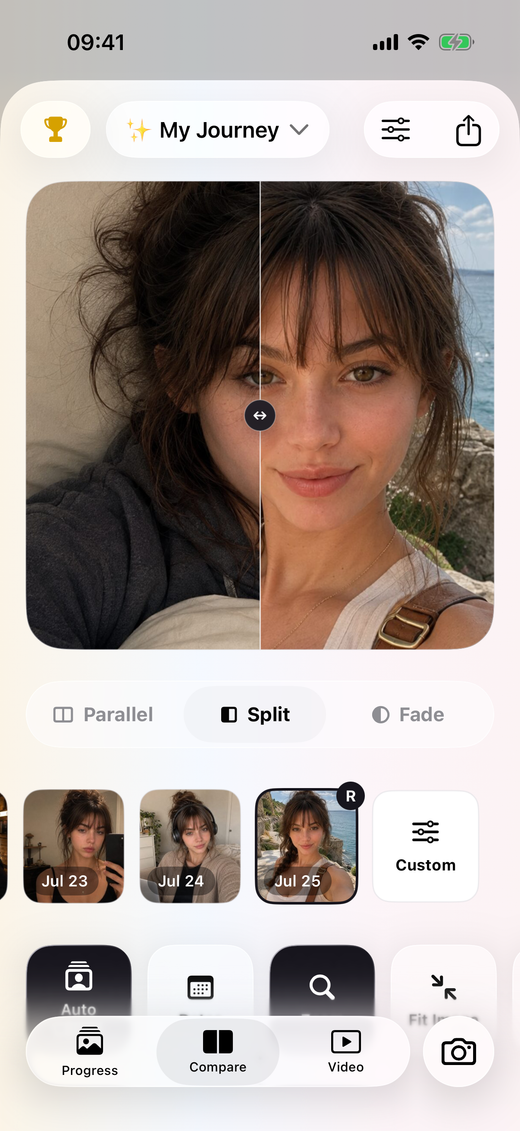
PhotoDays keeps progress photos together in dated albums. Use one for body progress photos, another for a plant, and another for a painting or a room you are improving. Compare any two dates to see what changed between them, and keep notes about the circumstances around each photo.
Build a clearer progress photo record.
- 01
Give the project its own album.
Start with a reference photo and a short note. Decide what you want to observe and choose a rhythm that makes sense: a weekly body progress photo or a regular picture of a longer creative project, for example.
- 02
Make the next frame consistent.
Use the previous photo and camera alignment guidance to help position your next shot. Try to keep the camera distance, angle and lighting similar so it is easier to compare the subject itself.
- 03
Compare dates and add context.
Pick two moments from your album and move through the comparison. Dates and notes help explain what happened between the images. Album charts can also show the activity and progress you have recorded.
Better comparisons start when you take the photo.
For fitness progress photos, a similar stance and camera position make the record easier to read. For plants, mark a spot for the pot and keep the camera at the same height. For creative work, include the full object and keep the background simple. The goal is a useful record, not a perfect photograph.
- Use similar light and avoid switching between strong sunlight and shadow.
- Keep the distance and framing as consistent as you can.
- Record useful context in a note instead of relying on memory.
- Compare an appropriate interval; visible change may take time.
A visual record, without a verdict.
Lighting, pose and camera angle can change how a photo looks. PhotoDays helps you organize and compare your own pictures; it does not analyze your body, calculate body fat or diagnose skin or health conditions. The camera guide helps with framing, but does not guarantee identical photographs.